
On this page
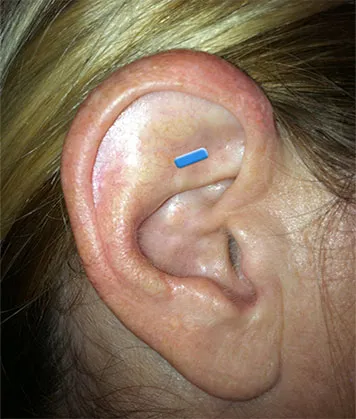
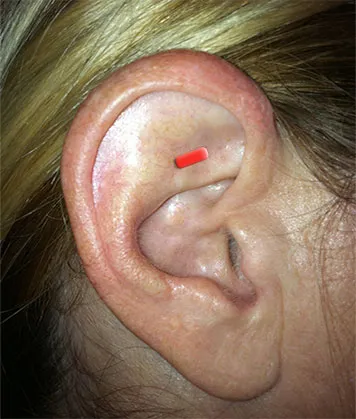
Blue mark and red mark
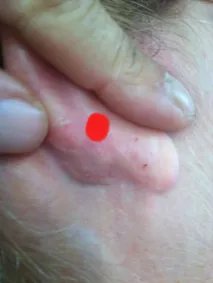
Every ear photo in the app carries a colored mark so you always know where the tip goes.
- Blue mark: place the tip on the front of the ear.
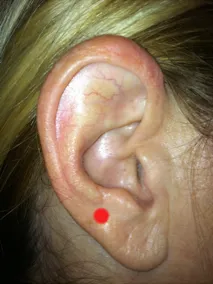
- Red mark: treat the back of the ear, directly behind it.
Why the back of the ear matters
The app's guide puts it plainly: the back of the ear is very important, because it relaxes muscles. Treat it after the front point.
The pinch method
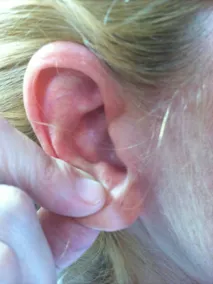
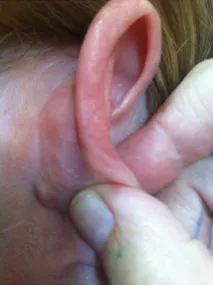
The treatment area on the back of the ear is located directly behind the red area. To find it:
- Pinch the red area between your thumb and index finger, with the index finger touching the red area and the thumb touching the back of the ear.
- The treatment area is under the thumb.
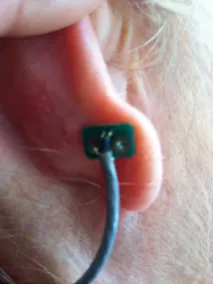
- Place the treatment tip, the headphone bud, on that point.
Which ear?
For pain on one side of the body, treat the ear on the same side: the right ear for pain on the right. For conditions without pain, such as anxiety, treat both ears.
Tip. Tap any photo in the app to zoom in, and tap See how to see the bud in place on a real ear.